

Automations
Set up rules that run by themselves: when something happens, CEEJAY checks your conditions and then does what you chose.
An automation is a rule in three parts. When something happens, if it passes your conditions, do one or more things. For example: when someone joins the server, give them a role and post a welcome message. CEEJAY watches your server and runs the rule each time.
What you see
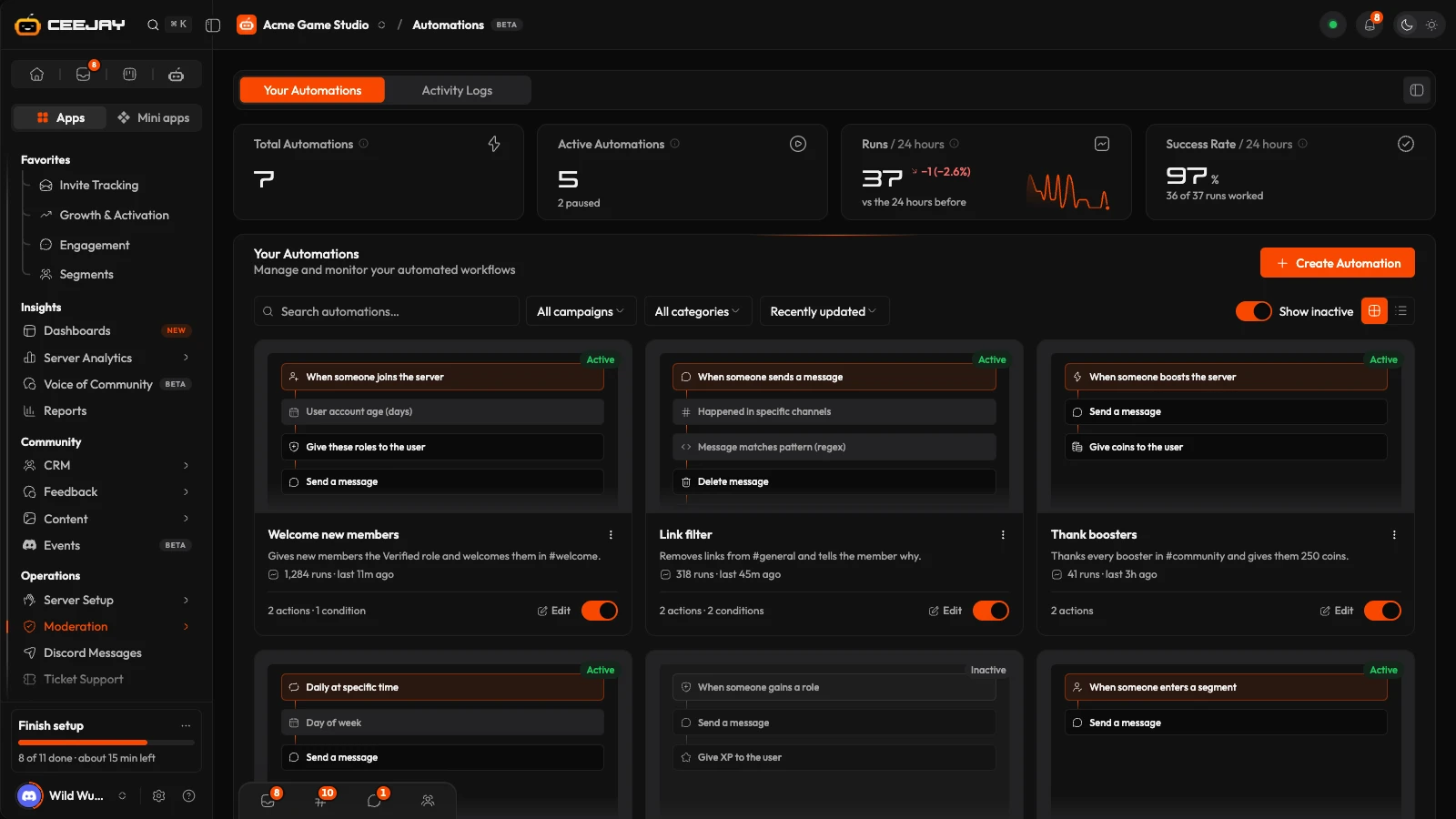
Go to Moderation → Automations. The page has two tabs, Your Automations and Activity Logs.
Four cards sit above the list: Total Automations, Active Automations, and Runs and Success Rate for the last 24 hours. A run that stopped at a condition is not counted as a run.
Each automation is a card with a picture of its steps, how many times it has run, and an on and off switch. The ⋮ menu has Edit, Duplicate and Delete. Paused automations are hidden until you switch on Show inactive, and a paused automation never runs. Activity Logs lists the latest runs with the automation's name, when it ran, and either Executed successfully or Failed with the reason, and each run says which of its actions did not go through.
Create an automation
Press Create Automation. Choose Start from scratch, or Use a template for ready-made ones such as welcome posts, link filters and scheduled reminders.
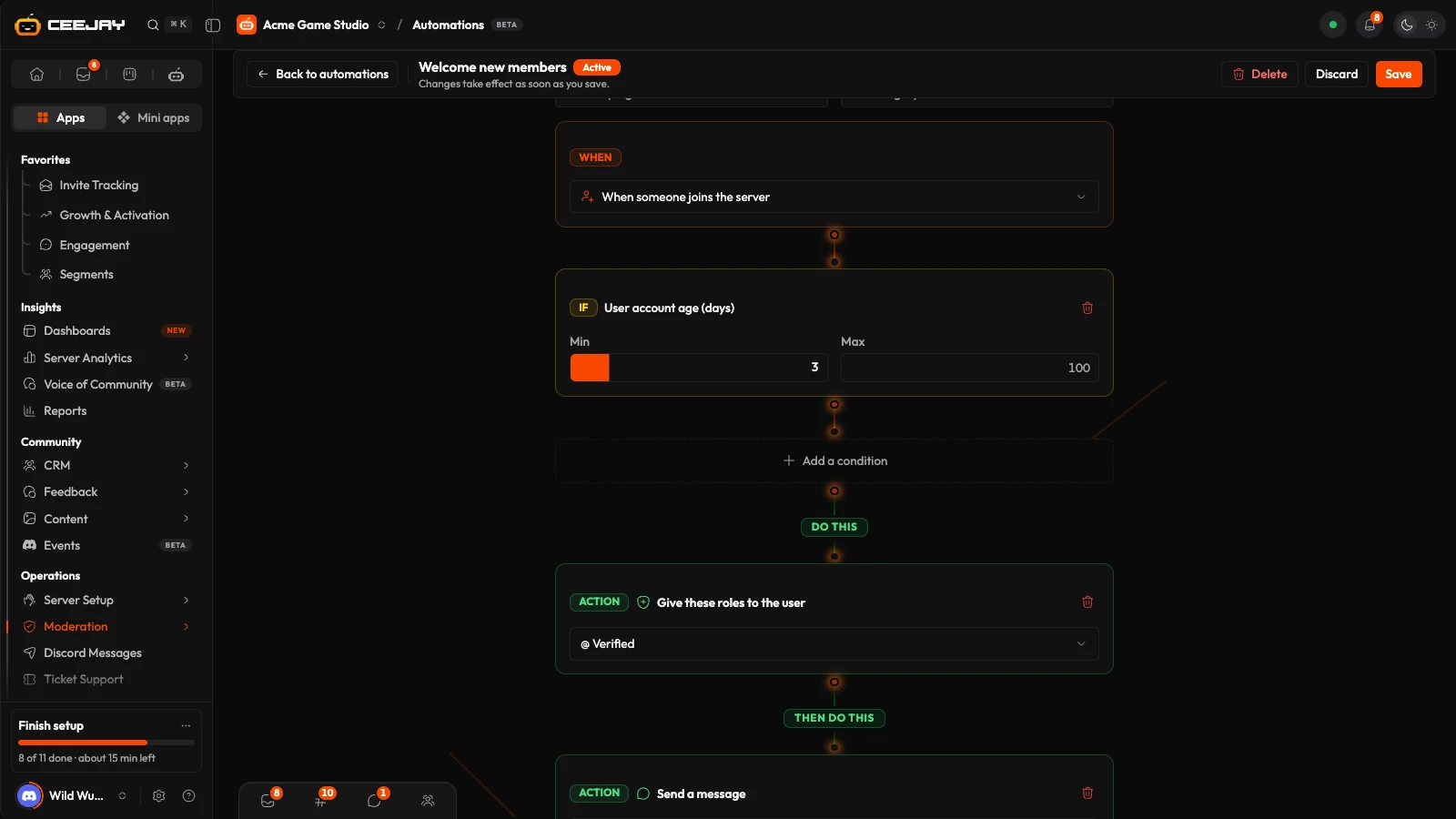
The builder is its own page. Give the automation a name, and a description if you like. Under When, pick a trigger from the list and fill in its settings.
Press Add a condition to narrow it down. The first is shown as If and the next ones as And: every condition has to pass, or nothing happens.
Press Add an action for each thing to do. They run in order, from top to bottom.
Press Publish. A new automation is switched on as soon as you publish it. For an automation that already exists the button is Save, and changes apply straight away. Discard leaves without saving, and asks first if you have changes.
A template opens already filled in, and is held back until you replace its [placeholders] and pick every channel, role, date and time it needs. Your work is kept in your browser as you build, and the list offers to resume it.
Triggers
Some triggers have settings of their own:
- When message contains specific words: type the Keywords (comma separated). It runs when a message contains any of them, anywhere in the text, ignoring capitals. With no keywords it never runs.
- When message reaches X reactions: set the Reaction threshold. It runs once per message, the first time one emoji on it reaches that number.
- When member is inactive for X days: set Inactive for (days). It counts from the member's last message, or from when they joined if they never posted. CEEJAY checks once a day, handles up to 200 members a day, and never runs the same automation for the same member twice.
- At specific time/date and Daily at specific time: pick the date and time, or the Time (24h format), and a Timezone. The date and time run once. A daily one runs at that time every day.
- When someone enters a segment and leaves a segment: pick the Segment, or Any segment. These run after each segment recalculation, which happens every 6 hours and when you ask for it on the Segments page.
- When a member does something on a linked platform: pick the Platform and Action. It runs within a minute of CEEJAY verifying the action, once per action. Actions from before the automation was switched on never run it.
- When a member does something in an app: pick the App and Action. It runs within a minute, once per action, and one member can start the same automation up to 5 times an hour, so an automation can never set itself off in a loop.
Conditions
Conditions look at who did it, where, and what was said. Use as many as you need.
Actions
Things worth knowing about specific actions:
- Message text can include
{user}(mentions the member),{username},{server}and{channel}. The segment, linked platform and app triggers add{segment},{previous_segment},{platform},{platform_action},{app},{app_action}and{target}. - Reply, repost, reactions, pin and delete need a trigger that has a message. The role actions only work on a role below CEEJAY's own role, and a role that belongs to a bot or integration is greyed out.
- Time out member takes a Duration (minutes), up to 28 days, and a Reason. Kick member, Ban member and Warn member take a Reason too. Kick and ban can each run at most 5 times an hour per automation.
- Wait/Delay takes Wait (seconds), up to 300, and holds the actions after it.
- Give coins to the member is skipped, not failed, when the economy is switched off. Coins given this way count towards the daily earning limit.
- Warn member sends the member the reason as a direct message, if they accept DMs from the server, and logs it in the automation's activity. Save to database adds your note to the member profile, shown under Automation notes, and the note can use the same
{user},{username},{server}and{channel}. - Send rich embed takes an Embed title, an Embed description and an Accent colour.
- Trigger webhook needs an
https://address on the public internet. CEEJAY sends a short JSON summary (the automation, the member, the channel and the first part of the message) and times out after 10 seconds. - Notify moderators and Log to channel post in the channel you pick, without pinging anyone.
What each action needs from Discord
| Action | Permission CEEJAY needs |
|---|---|
| Send a message, Reply to the message, Log to channel, Notify moderators | Send Messages in that channel |
| Send rich embed | Send Messages and Embed Links in that channel |
| Repost the whole message in another channel | Send Messages in the destination channel, and Attach Files to repost pictures and files |
| Send DM to member, Warn member | None, but the member must accept direct messages from the server |
| Give these roles to the member, Take these roles from the member, Toggle role, Assign multiple roles | Manage Roles, with CEEJAY's role above the role |
| React on the message | Add Reactions |
| Remove reaction, Clear all reactions, Pin the message, Delete message | Manage Messages |
| Create a thread from the message | Create Public Threads |
| Move to voice channel, Disconnect from voice | Move Members |
| Voice mute and Voice deafen | Mute Members and Deafen Members |
| Time out member | Timeout Members |
| Kick member | Kick Members |
| Ban member | Ban Members |
Good to know
If an action fails, the actions after it do not run, and the run is marked Failed under Activity Logs with the reason, such as a missing permission or a role above CEEJAY's. A direct message to a member who blocks DMs from the server is not delivered, and the other actions still run. Each action needs the matching Discord permission, listed above. See Add the bot.
Kick, ban, timeout and delete
Kick member, Ban member, Time out member and Delete message act on real members and their messages the moment a rule matches. Messages and direct messages go out every time a rule matches too, so a rule on When someone sends a message with no condition posts for every message. Start with narrow conditions, such as one channel or a role, and watch Activity Logs before you widen it.

