

Inbox and Workspace
Your team's inbox, tasks, calendar, docs and resources.
The Inbox and the Workspace are for your team: everyone with a login to your CEEJAY dashboard, such as the server owner, admins, bot masters and invited team members. They are not for your community's members.
- The Inbox is everything addressed to you: Discord pings, tasks assigned to you, replies to your comments, and alerts from CEEJAY. Its Messaging tab is a chat for your team.
- The Workspace is where the team plans together: tasks on a board, a calendar of everything dated, docs, a shared library of links and files, and a view of each person's workload.
Tasks, docs and resources belong to the community you have selected, and everyone with access to the Workspace sees the same ones. There are no separate projects: the community is the project.
Good to know
A team member sees only the pages their team gave them, so someone can have the Inbox without the Workspace. The owner and admins control this in Team management.
The Workspace Overview
Workspace opens on Overview, with tabs for Tasks, Calendar, Resources, Docs and Team beside it.
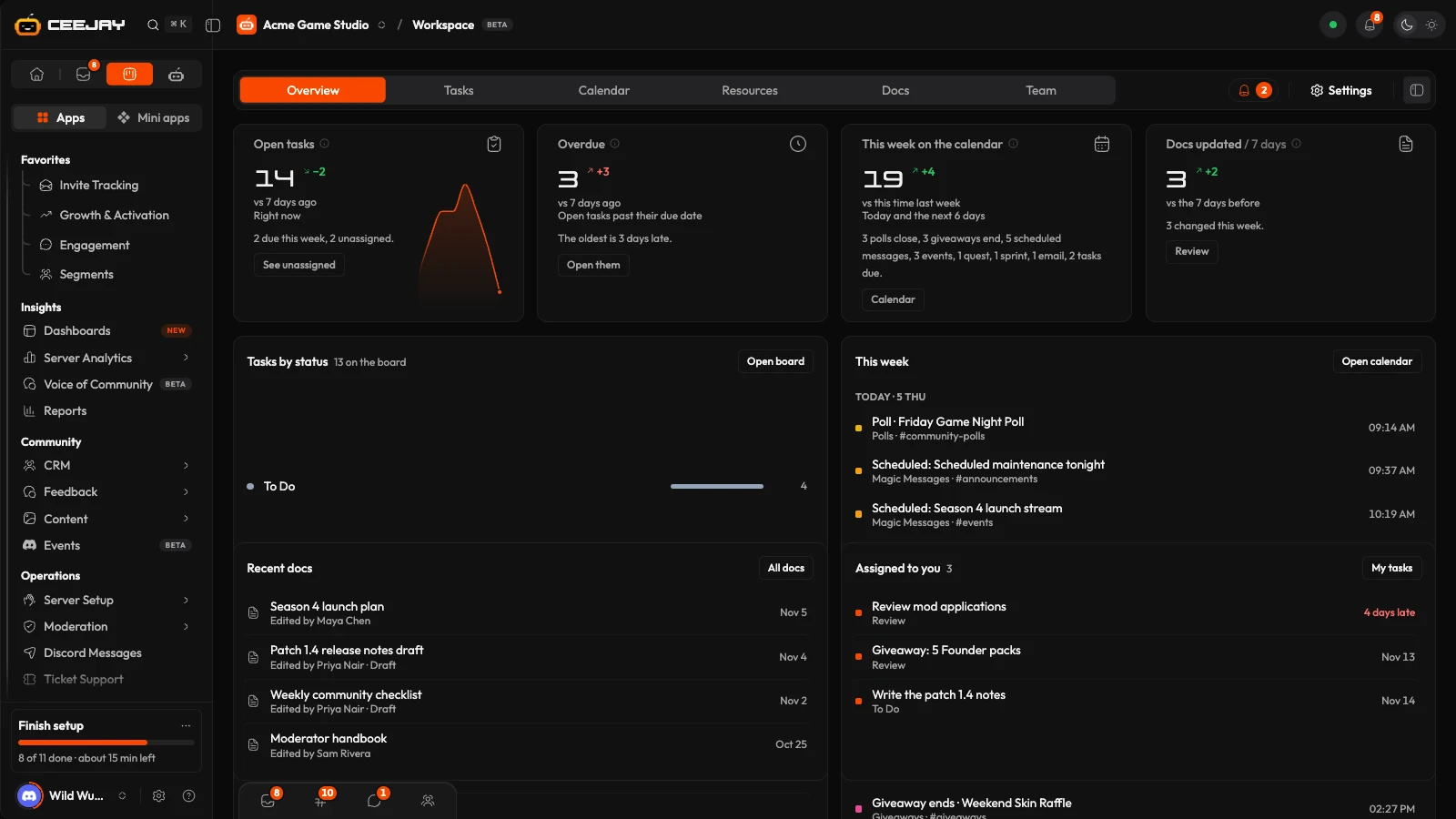
Four cards answer how the team is doing. Each compares with seven days ago and ends in a link to the place to act on it.
- Open tasks: tasks not finished or archived, with how many are due this week and how many have nobody assigned. Fewer is better.
- Overdue: open tasks past their due date, and how late the oldest is.
- This week on the calendar: everything dated today or in the next six days, such as tasks, polls closing, giveaways ending and scheduled messages.
- Docs updated: docs created, edited or published in the last seven days.
Under them:
- Tasks by status shows how many tasks are in each column of the board. Press a row to open the board filtered to that status, or Open board.
- This week lists what is coming, day by day, with Open calendar. Press a task to open it.
- Recent docs lists the latest docs, with All docs.
- Assigned to you lists your open tasks, with My tasks.
The Needs attention bell beside the tabs lists tasks that are overdue, open tasks with nobody assigned, and anyone with more than twice the team's median number of open tasks. Each item has a button: Open tasks and Assign them take you to the tasks, and Rebalance takes you to the Team view. Settings in the bar opens the Workspace settings: see Tasks.
In this section
Inbox
Everything addressed to you, and the team chat in Messaging.
Tasks
The task board, filters, and how to create and assign a task.
Calendar
One month view of everything scheduled, and your own events.
Docs
Write team docs with live charts and tasks inside them.
Resources
Links, files and folders, with a nightly check for broken links.
Team
Who is on the dashboard and each person's workload.

