

Honeypot
Set up a honeypot channel that removes spam bots and compromised accounts the moment they post in it.
A honeypot is a channel no real member has a reason to post in. Spam bots and compromised accounts post in every channel they can see, so a message in the trap is a strong sign of one. When someone who is not exempt posts there, CEEJAY deletes the message, bans, kicks or times out the member, and tells your team.
What you see
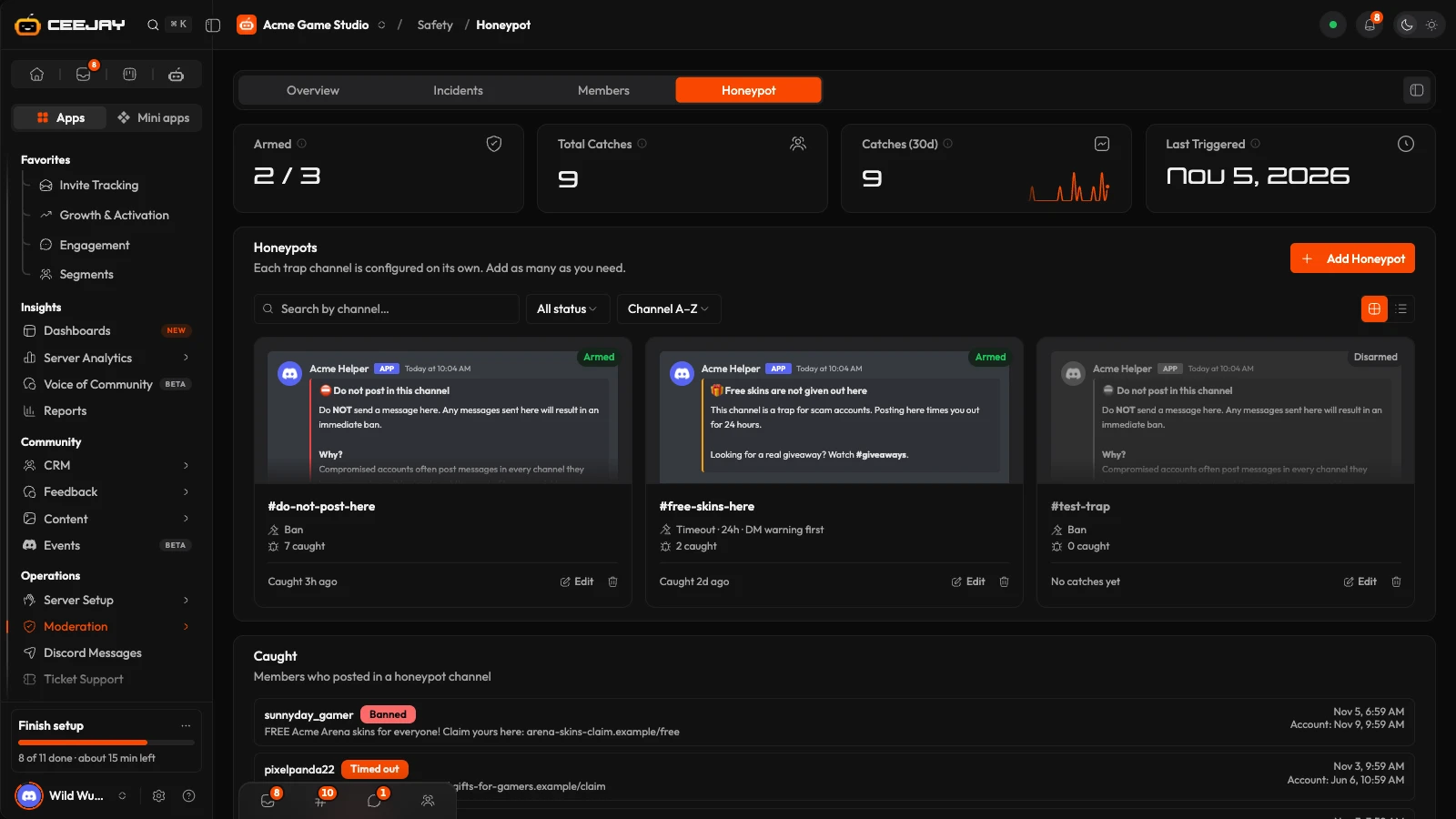
Go to Moderation → Honeypot. Two tabs, Setup and Detection log, sit at the top, with four cards under them.
- Active: how many honeypots are active, such as 2 / 3. A honeypot only works when it is enabled and has a channel.
- Total detections and Detections (30d): how many times a honeypot banned, kicked or timed out someone. Someone caught twice counts twice. Exempt members and failed attempts are not counted.
- Last Triggered: the latest time anything was posted in a honeypot channel, exempt members included.
Setup lists your honeypots as cards showing the warning message as it looks in Discord, or as rows if you switch the layout. Each card has an Active or Inactive stamp, the action (for example "Timeout · 24h", with "DM warning first" when that is on), how many members it has caught, and when it last caught one. Search by channel, filter by Active or Inactive, and sort by channel name or age.
Set up a honeypot
Press Add Honeypot, then choose Start from scratch, or Use a template to begin with a ready-made warning message.
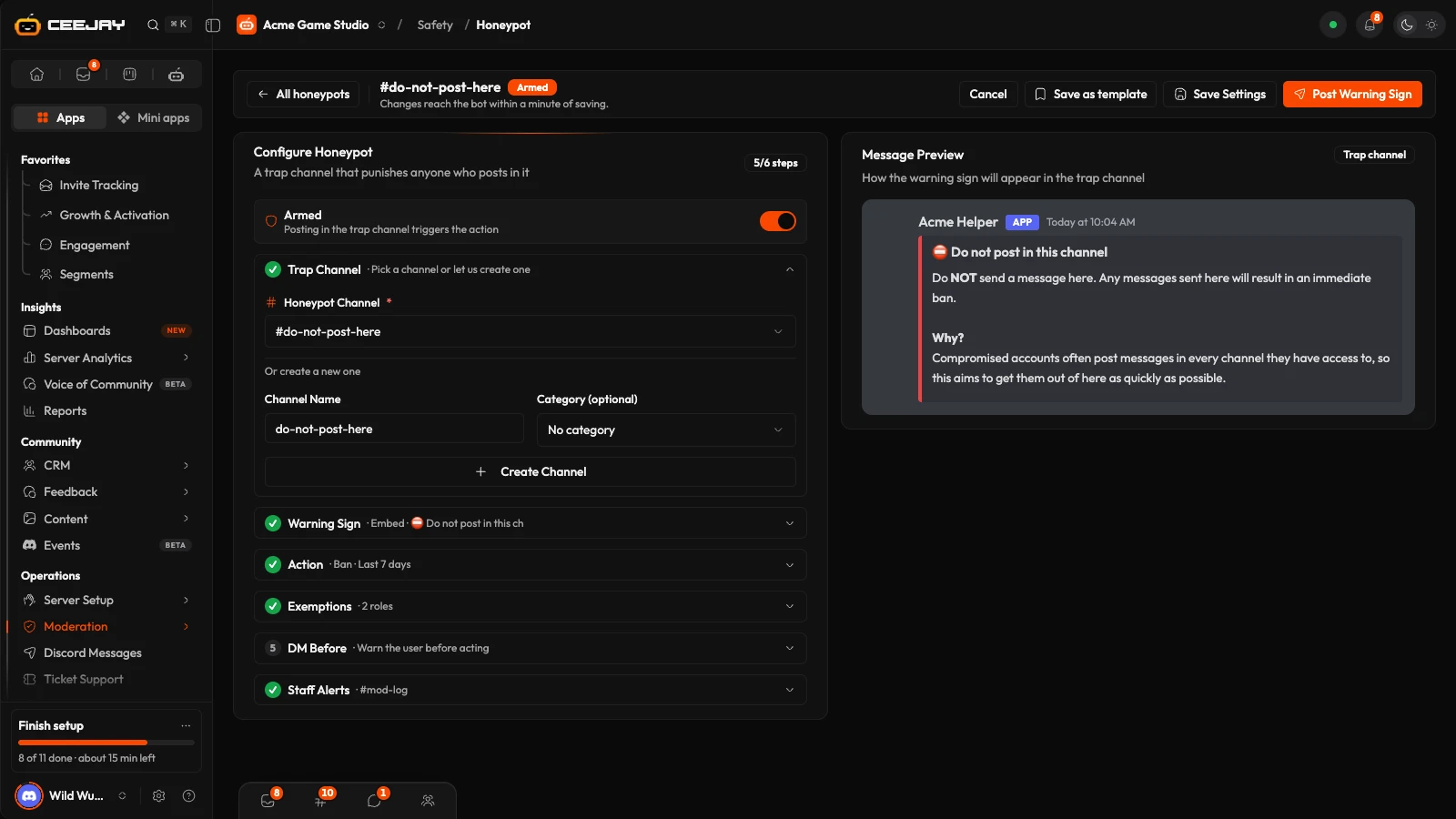
Open Honeypot Channel. Pick a channel under Honeypot Channel, or make one: type a Channel Name, choose a Category (optional) and press Create Channel. A channel that is already another honeypot's trap is not offered.
Open Warning message and write what the channel says. See the next section.
Open Action and choose Ban, Kick or Timeout under What happens to whoever posts. A ban can also delete the member's recent messages across the whole server: pick Don't delete anything, Last hour, Last 24 hours or Last 7 days under Also delete their messages from. A timeout takes a Timeout Length (minutes), up to 40,320 (28 days). Reason (shown in Discord's audit log) starts as "Posted in honeypot channel". Change it if you like.
Open Exemptions and switch on any roles under Additional exempt roles whose members should never be caught.
Optional: open Warn first and switch on DM the user before acting to send the member a message of your own first. The last step has a Log Channel, where CEEJAY posts an alert each time someone is caught.
Turn on the switch at the top of Configure Honeypot. It reads Disabled until you do, and a disabled honeypot does nothing. It needs a honeypot channel before it is active. Press Save Settings. Changes take effect within a minute.
Press Post warning message. CEEJAY saves your settings and posts the sign in the honeypot channel within about 10 seconds.
The warning message
The sign is the message CEEJAY posts in the honeypot channel. Choose a Message Type: Embed (with Embed Title, Embed Description, Image, Thumbnail and Embed Color), Plain text or Components V2. An image on its own is enough. If you leave the sign empty, CEEJAY posts a default warning instead. Message Preview shows the sign, and shows your DM instead while Warn first is open and switched on.
Real members read the sign and leave, so say plainly what happens. The starting text says posting means an immediate ban. If you choose Kick or Timeout, reword it to match.
Press Post warning message again after changing the sign. CEEJAY posts the new one and removes the old one. Deleting the honeypot removes its sign too.
Templates
Four built-in warning messages are in the template gallery:
- Spam trap starts as a ban that deletes the member's messages from the last 7 days.
- Scam link trap starts as a 24-hour timeout.
- Free-items scam trap starts as a ban. It is written for gaming communities.
- Fake support trap starts as a ban. It is written for tech communities and points to a support channel in square brackets, which you replace.
A template fills in only the warning message and a starting action. You still pick or create the channel, and it is saved as disabled. If the sign still has a placeholder in square brackets, the page says what to replace, and Post warning message stays disabled until you have. Save as template saves your own sign and settings for your community, without the honeypot channel and the switch.
What happens when someone posts
- If DM the user before acting is on, CEEJAY sends the member your message first, because a banned member can no longer be messaged. Someone with direct messages closed does not get it. It goes out before CEEJAY tries the action, so it is sent even if the action then fails.
- CEEJAY deletes the message.
- CEEJAY bans, kicks or times out the member, with your reason in Discord's audit log.
- CEEJAY adds the catch to Detection log, posts an alert in your Log Channel if you set one, and sends your team a notification, such as "Honeypot: Spambot was banned". It is listed as Honeypot triggered in notification settings. By default it shows in the dashboard and is emailed, and each person can change that.
A message in an armed honeypot channel is handled before anything else. It is not saved with your other messages and does not count in analytics, XP or keyword tracking.
Some posts are handled differently:
- Exempt members: no action is ever taken against Administrators, the server owner or anyone with a role you chose. Their message stays, and Detection log lists them as Exempt. There is no alert and no notification.
- Other bots are not exempt. A bot that posts in the trap gets the same treatment as anyone else.
- Webhook posts are deleted. A webhook is not a member, so no action is taken against it and Detection log shows Failed with a reason saying there is no member to act on.
- Actions CEEJAY cannot take: if the member's highest role is above CEEJAY's, the message is still deleted, and Detection log shows Failed with a reason such as "CEEJAY can't ban this member". Move CEEJAY's role higher in your Discord role list.
Detection log
Detection log lists the latest 20 times someone posted in a honeypot channel, newest first. Each row has the member's name, a badge (Banned, Kicked, Timed out, Exempt or Failed, plus Reverted after an undone ban), what they posted, the date, and the date their Discord account was created, after Account. A failed row says why in red.
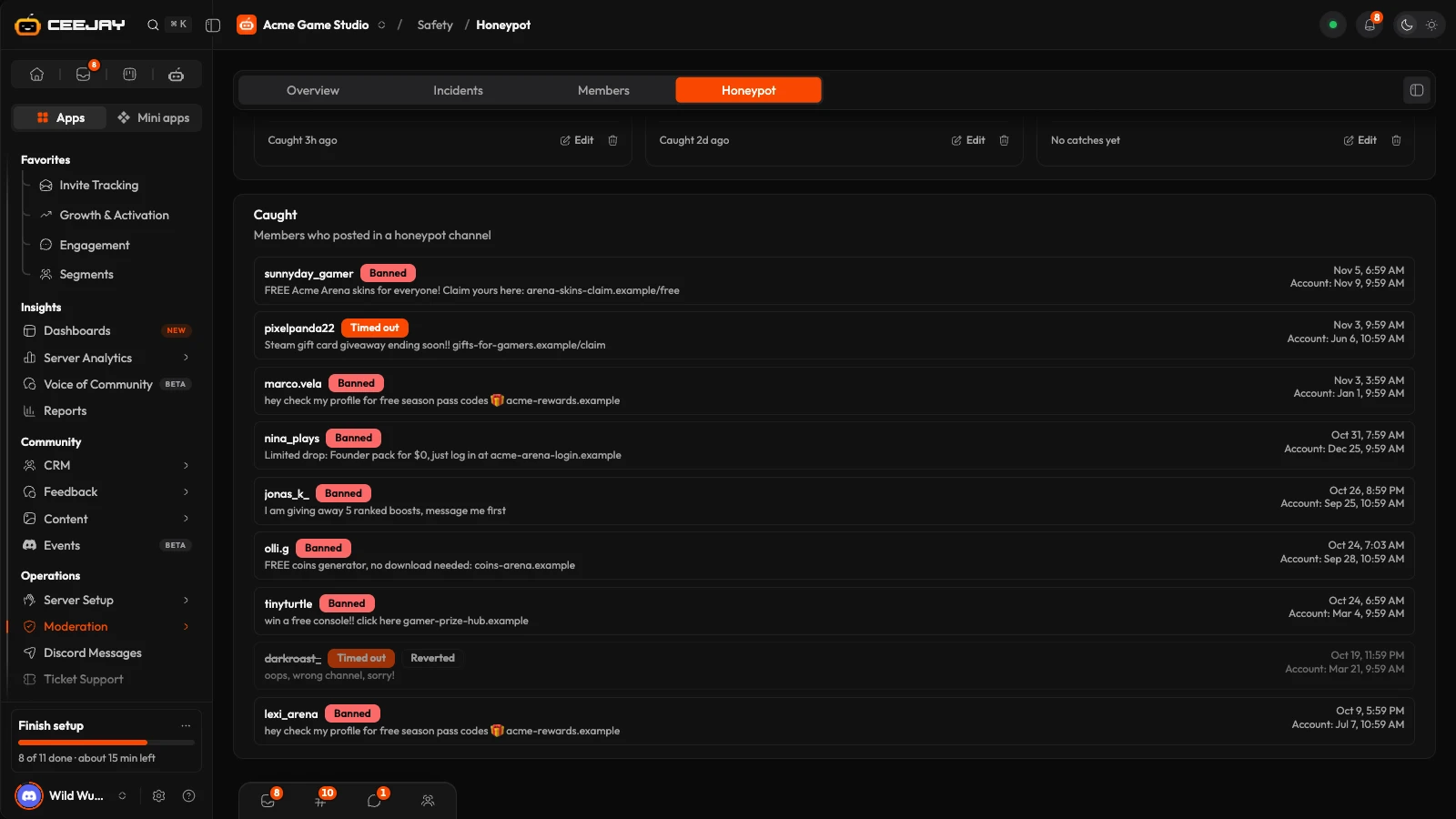
CEEJAY stores the first 500 characters of the message with the catch. Your team can read it here if they can open the Honeypot page, and anyone who can see your log channel can read it there. Catches remain in the list after you delete a honeypot.
Undo a ban
For a ban, the alert in the Log Channel shows the member, when their account was created and when they joined, which is usually enough to spot a mistake. It has an Unban button. Press it and CEEJAY lifts the ban, marks the alert as reverted and removes the button. Detection log then shows the row as Reverted.
Only someone with the Ban Members permission in Discord can press Unban. Kicks and timeouts have no button. A kicked member can join again with an invite, and a timeout can be lifted in Discord.
What CEEJAY needs in Discord
- Manage Messages in the honeypot channel, to delete the post.
- Ban Members, Kick Members or Timeout Members, for the action you chose. Ban Members is also what makes the Unban button work.
- Send Messages and Embed Links in the honeypot channel, to post the sign, and in the log channel, to post alerts.
- Manage Channels, only to create the channel from the builder. CEEJAY creates a text channel that everyone can see and post in, because a trap has to be reachable, but where members cannot add reactions or start threads.
- A role above the roles of anyone who might post.
See Add the bot for what each permission is for.
This acts on members by itself
Anyone who is not exempt and posts in the trap is removed straight away, including a real member who ignores the sign and any other bot. Moderators are not exempt unless they have the Administrator permission or a role you add under Exemptions. Keep the sign clear, exempt your moderators, and check Detection log after you enable a new trap.
Good to know
A channel can be the trap for one honeypot only, and a honeypot cannot be duplicated. Any message in the trap triggers it, not only links. A Disabled honeypot does nothing, so you can set one up ahead of time.
Related
Automations
Set up rules that run by themselves: when something happens, CEEJAY checks your conditions and then does what you chose.
Ticket Support
Give members private tickets for each kind of question, with an intake form, and answer them from Discord or the dashboard while you track first response time.

