

Account Linking
Let members link their Steam, Twitch, X and other accounts, then see what linked members do for your community on those platforms.
Account Linking shows which members own your game, follow your channels or back you on other platforms, and rewards them for it. It connects a member's Discord identity to accounts they have elsewhere: X, Twitch, Steam, a wallet and more. CEEJAY can then assign them a role, check what they do for you there (follows, likes, subs, playtime, reviews) and let you find them in Members and Segments. It sits in CRM → Account Linking.
How members link
- You send a link panel to a channel: a Discord message with one button for each platform.
- A member presses a button. CEEJAY replies with a message only they can see, containing a link that works for 15 minutes.
- They open the link, sign in on the platform and the account is linked. If you chose a Role for linked members for that platform, they are assigned it. They see a confirmation page showing both accounts and the role they earned, and Back to Discord returns them to your server.
Before and after they link, members see which data each platform shares and where to revoke access. They can unlink an account at any time from its button in Discord, and your team can unlink one from the Members tab. Linking Steam does not store a member's real name.
Members can also link from quests. When a link breaks (the member revoked access, or it expired) it is counted under Need reconnecting until they link again.
What you see
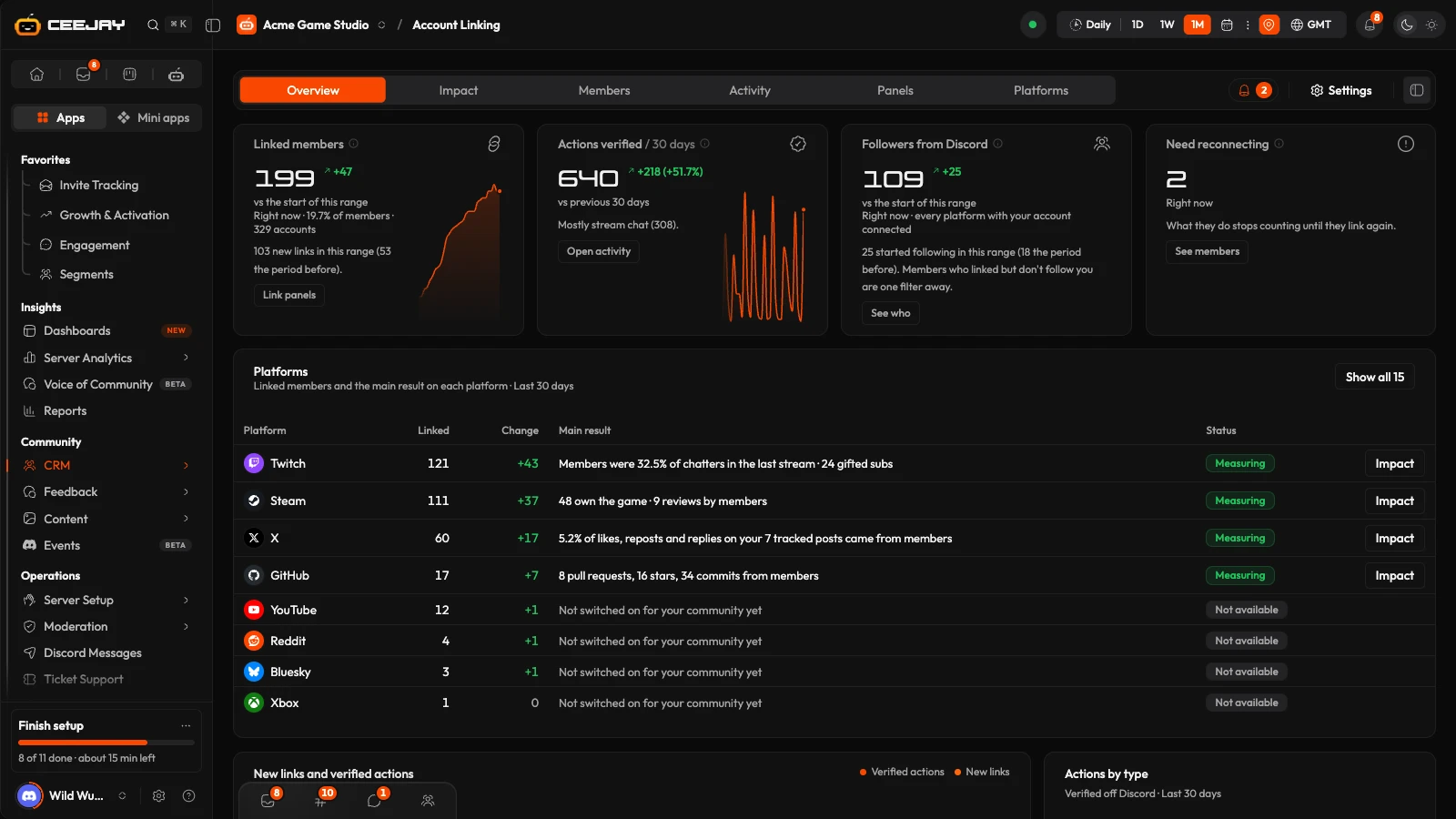
Six tabs, and a Needs attention bell beside them when an item needs attention: broken links, accounts to sign in to again, platforms that members linked but nothing measures, members who linked an account but did not get the reward role, and X spend near its cap. Overview and Impact follow the date range and compare setting in the header. The other four ignore them.
Overview
- Linked members: members with at least one working linked account, right now. A member with three linked accounts counts once. The change is against the start of the range.
- Actions verified: actions linked members took for you on other platforms, checked on the platforms themselves: follows, likes, reposts, quotes, replies, comments, stream chat, subs, gifts, bits, pledges, reviews, stars, commits, pull requests, badges and token buys or sells. Each is counted once.
- Follow you from Discord: linked members who follow your own account on X, YouTube, Twitch, Bluesky or Kick at the latest check. A member who follows on two platforms counts once.
- Need reconnecting: links that can no longer be checked.
- Platforms: Platform, Linked, Change, Main result and Status for each platform, with an Impact or Set up button. Statuses are Measuring, Sign in again, Not measured yet, Linking only, Off and Not available. A platform that nobody has linked and that is not set up stays hidden until you press Show all.
- New links and verified actions, Actions by type and Top members across platforms, whose All linked members button opens the Members tab.
With nothing linked yet the tab says "No linked accounts yet" and offers Create a link panel.
Impact
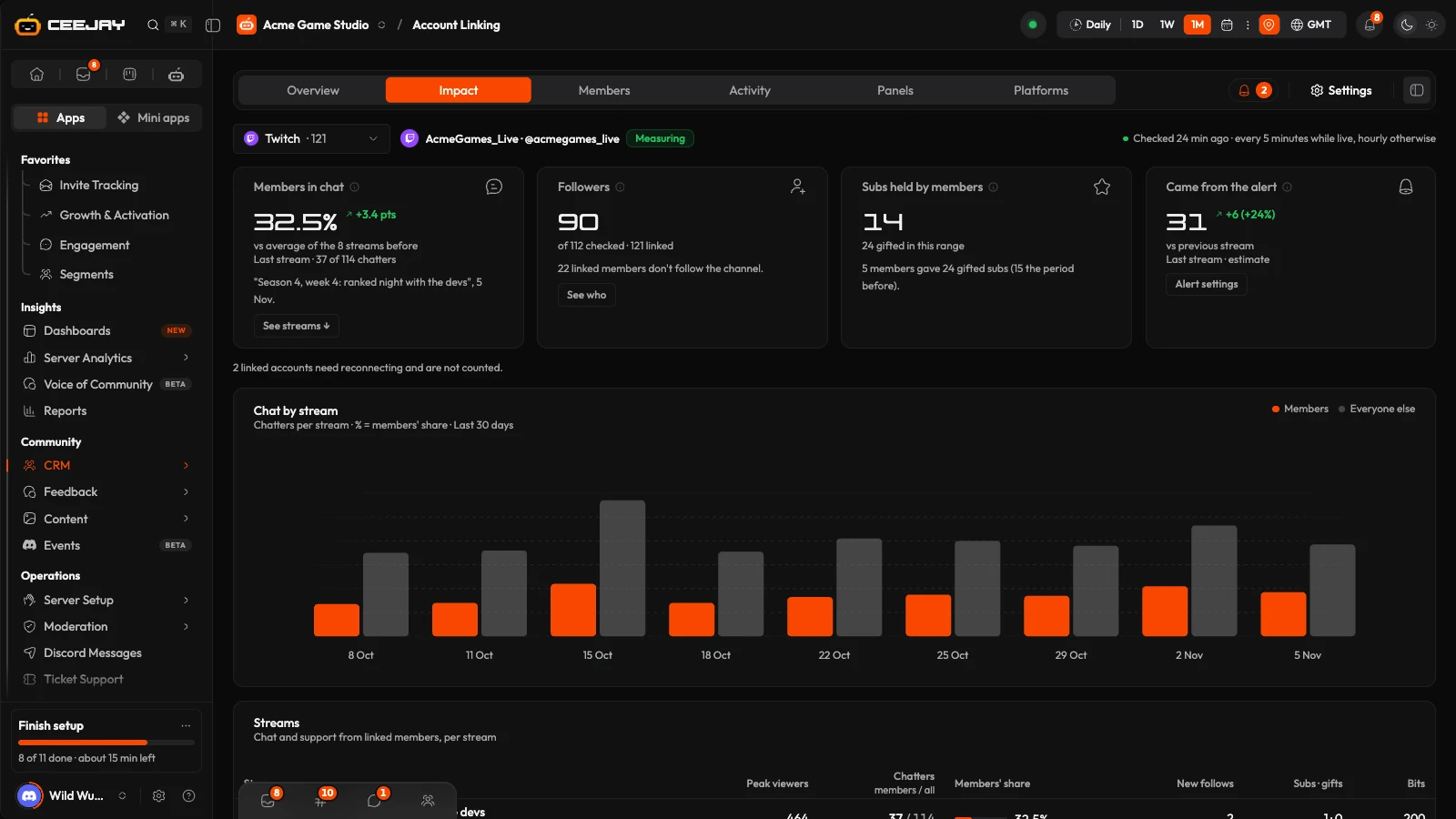
Pick one platform from the Platform menu. Beside it you see your own account on that platform and when it was last checked. Four cards, a chart and detail tables follow, for the date range in the header.
| Platform | What you see |
|---|---|
| X, Bluesky | Members' share of engagement (the likes, reposts, quotes and replies on tracked posts that came from linked members), Members following you, Reposts and quotes by members and Reach through members, which is an estimate. A table of Tracked posts and Top amplifiers. On X, this month's spend against your cap. |
| Twitch, Kick | Members in chat, Members following you, Member subscribers, Came from the alert (an estimate, from the go-live alerts you set up in Social Feeds). Then a Chat by stream chart, a Streams table and a Top supporters table. |
| YouTube | Members subscribed, Comments by members, Members' share of comments, Creators among members, your Videos and the Creators in your community. |
| Steam | Own the game, Played in the last 2 weeks, Median hours, last 2 weeks, Reviews by members, and the Owners who stopped playing. |
| Web3 wallet | Linked wallets holding, Share of supply held by members, Buys by members, Sells by members and the Largest holders among members. |
| GitHub, Reddit, Roblox, Last.fm, Patreon, TikTok | Counts of what members did, such as pull requests, comments, badges, plays, new pledges or videos with your tag, and who did the most. |
On X and Bluesky, Track a post counts the likes, reposts and replies on one post by its link. Posts from your own account that are shared in Discord are tracked automatically, and each post is checked for 10 days. Stop tracking ends it and retains the data already counted.
Members
Every linked member once, with their accounts. Search members or handles, filter by Platform and by state, and sort by Most actions, Newest link or Name. The states are Follows your account, Linked, not following you, Needs reconnecting, Owns the game, Doesn't own the game, Owns the game, stopped playing, Holds your token, Subscriber or patron and Active off Discord, last 30 days. The table shows Member, Linked accounts, Follows you on, Actions and Discord messages (both for 30 days) and Last checked. A faded mark means the member linked that platform but does not follow your account. A yellow ring means the link needs reconnecting. A row's menu has Unlink for each of the member's accounts, after a confirmation, and removes the role that platform assigned. A member with Steam linked shows the same Steam card as their profile. Save as segment, available once you have picked a platform or a state, saves the current filter as a segment: name it and press Save segment. With Keep it up to date on, members join and leave it as their linked accounts change.
Activity
Links, unlinks and verified actions, newest first. Filter by Platform, by kind (Links and unlinks, or one group such as Likes or New follows) and by source: Quest check, Scheduled check, Live event, Webhook or Link. Load more shows older items.
Panels
The link panels you have made, as cards or a list, with Draft and Sent states, search and sort.
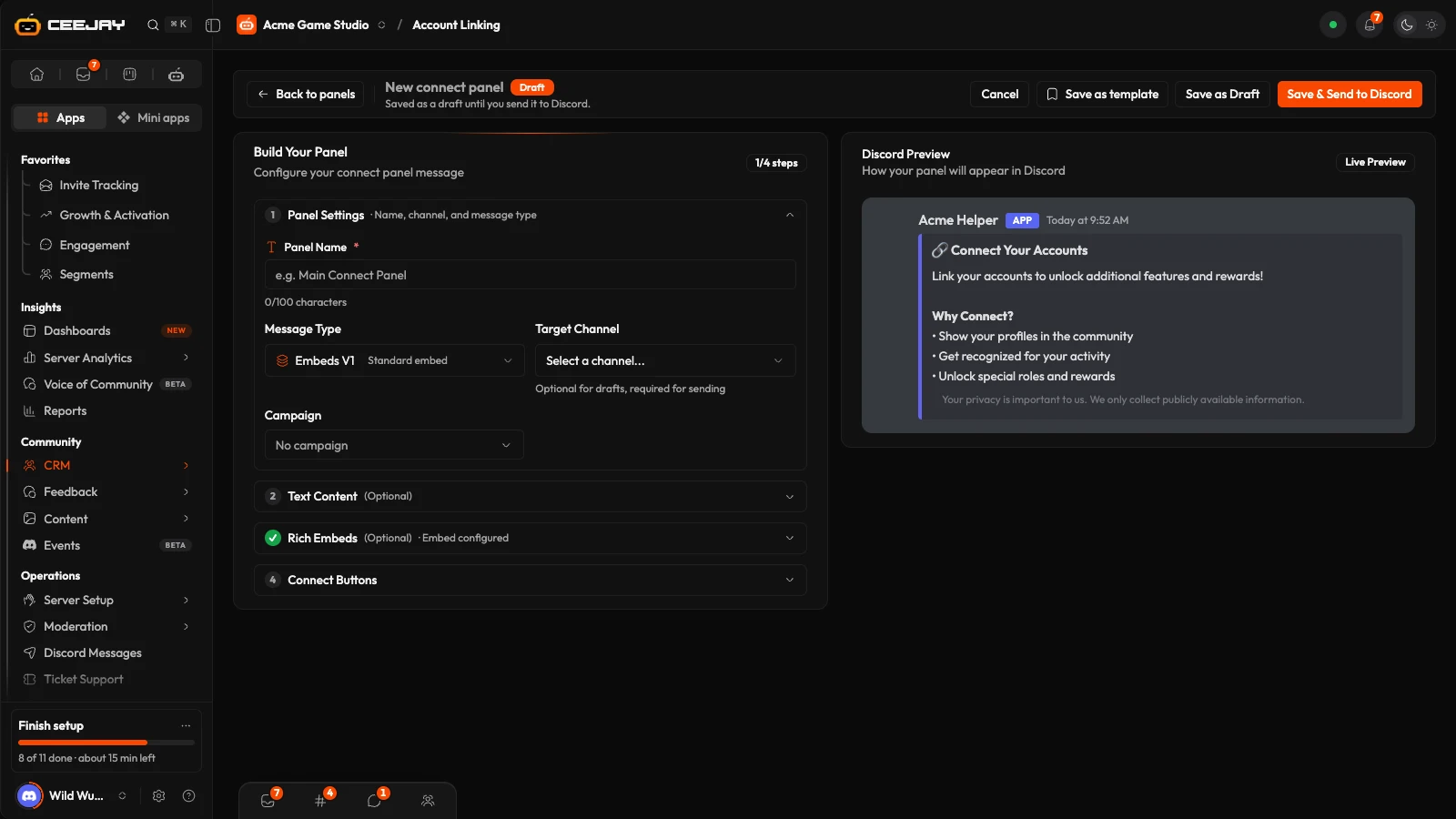
Press Create Panel. In New panel, choose Start from scratch or Use a template.
In Panel Settings, name the panel, pick the Message Type and the Target Channel. Embeds V1 is a standard embed and Components V2 is Discord's newer layout. Write the message in Text Content and the embed fields.
Under Connect Buttons, pick Add Platform... for each platform. For each button you can change its Style and Label and add an emoji. More than five buttons are split into rows. Discord Preview shows the result.
Press Save as Draft, or Save & Send to Discord. A panel you have already sent shows Save & Update Discord, which edits the Discord message. Save as template saves the message and buttons for later.
On a panel's card, Send to Discord posts a draft and Resend posts it again. A panel with no channel asks for one first.
Platforms
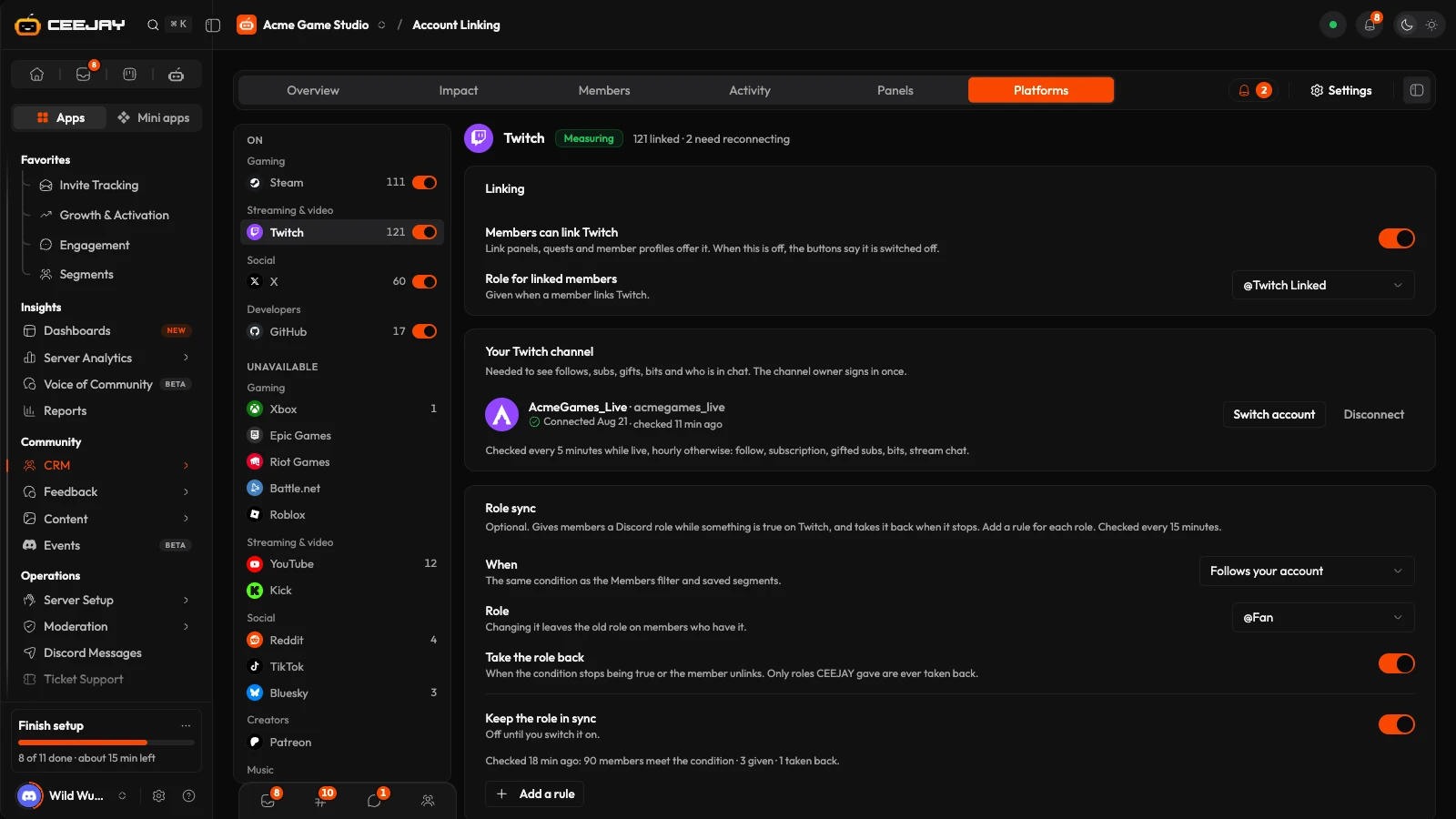
Platforms are grouped by what members can do: On, Off (you switched linking off) and Unavailable (not set up for your community yet). Inside each, they are sorted by kind: Gaming, Streaming & video, Social, Creators, Music, Developers, Other and Web3. The list stays in place while you scroll a platform's settings. Pick one to see its settings:
- Linking: the switch named after the platform, for example Members can link Twitch, and the Role for linked members. With the switch off, link panels no longer offer the platform and the buttons tell members it is switched off.
- Your own account, so CEEJAY can measure its activity. See below.
- Tracking: what is measured and how often. For X, Tracked posts (posts shared in Discord plus ones you add, every post from your account, or only posts you add), Follow check (Weekly, Daily or Only for quests) and a Monthly spend cap. X charges for every item CEEJAY reads, so checks pause at the cap and resume on the 1st.
- Role sync: see below.
- Shared data: the data members see before they link.
The settings that apply to every platform are in Settings → Integrations → Account Linking: rewards for linking an account (where Connected apps is on) and the Link page. There you add your own Logo (or Use the server's icon), a Logo colour, up to four Footer links, and choose whether to Show CEEJAY on the page members see after linking. Your Web Page's privacy policy and terms show at the bottom when you have added them.
Connect your own account
To count what members do for you, tell CEEJAY which account or game to measure. Until you do, a platform shows Linking only. Open Platforms, pick the platform and fill in the card at the top. The first check runs within the hour. Your game on Steam is saved in Connected Apps instead.
| Platform | What you give CEEJAY | Checked |
|---|---|---|
| X | Sign in with X | Hourly for 72 hours after a post, then daily for 7 days |
| Twitch | Sign in with Twitch | Every 5 minutes while live, hourly otherwise |
| YouTube | Channel ID or URL | Every 6 hours |
| Web3 wallet | Chain, Contract address and Type | Every 6 hours |
| GitHub | Repositories, as owner/repo | As events arrive |
| Roblox | Group ID, Badge IDs, Game pass IDs | Daily |
| Subreddit | Hourly | |
| Last.fm | Artist name | Daily |
| Bluesky | Handle | Hourly for 72 hours after a post, then daily |
| Kick | Sign in with Kick | As events arrive |
| Patreon | Sign in with Patreon | Daily |
| TikTok | Hashtag or @mention | Daily |
GitHub events are received through the inbound webhook of the GitHub card in Integrations: connect GitHub there and add the webhook to your repository, or nothing is counted. Signing in sends you to the platform and back. CEEJAY only reads and never posts as the account. Disconnect stops new checks and retains the data already counted. Riot Games, Battle.net, Xbox and Epic Games can be linked but nothing about them is measured yet.
With your game saved in Connected Apps, you can use Quests to reward members who wishlist, follow or own your game, or play it for a set number of hours. The Rewards Engine's key lists show which keys were used. Owners and admins can also add a Keys received column in Members.
Role sync
Role sync assigns members a Discord role while a condition is true on a platform, and removes it when the condition stops being true. For example, a Fan role for members who follow your channel and a Supporter role for subscribers.
On the platform's page, find Role sync and choose When the role applies, such as Follows your account or Active off Discord, last 30 days. These are the same conditions as the Members filter.
Choose the Role. CEEJAY can only assign roles below its own role in Discord.
Leave Remove role automatically on to remove the role when the condition stops being true or the member unlinks. CEEJAY only removes roles it assigned. Switch Keep the role in sync on.
Add a rule adds another role for the platform, up to 10 rules, each with its own role. CEEJAY checks every 15 minutes and changes up to 60 members per rule in a run, so a big group takes a few runs. Under each rule it says when it last ran and how many members it assigned the role to and removed it from. Nothing happens until your own account on that platform is connected.
Discord Linked Roles
At the bottom of Platforms, Discord Linked Roles lets you use a linked account as a requirement for a role in Discord's own role settings, and gives members a verified badge. Press Set up in Discord once. Then, in Discord, open Server Settings → Roles, pick a role and choose Links. The data shared is how many accounts a member linked and whether X, Twitch, Steam and a wallet are linked.

