

XP
Give members XP for taking part, set the levels and rewards they reach, and run seasons.
XP is how CEEJAY measures taking part. Members earn it by chatting, being in voice, reacting and posting, then climb levels that can give roles and other rewards. You choose how much each action is worth, who earns more, and where the limits are.
What you see
Go to Gamification → XP. The page has five tabs:
- Overview: how XP is moving across a date range. It follows the range picker and the Compare switch in the header.
- XP Leaderboard: every member ranked by XP, with search and a level filter.
- Levels & Tiers: the ladder of levels, the rewards at each level, and named tiers.
- Boosts: channels and roles that earn more XP, and roles that earn none.
- Seasons: a leaderboard that resets, with prizes for the top places.
The bell beside the tabs is Needs attention. Settings at the top of the page opens Settings → Rewards → XP beside the page, where you set the earning rules.
Overview
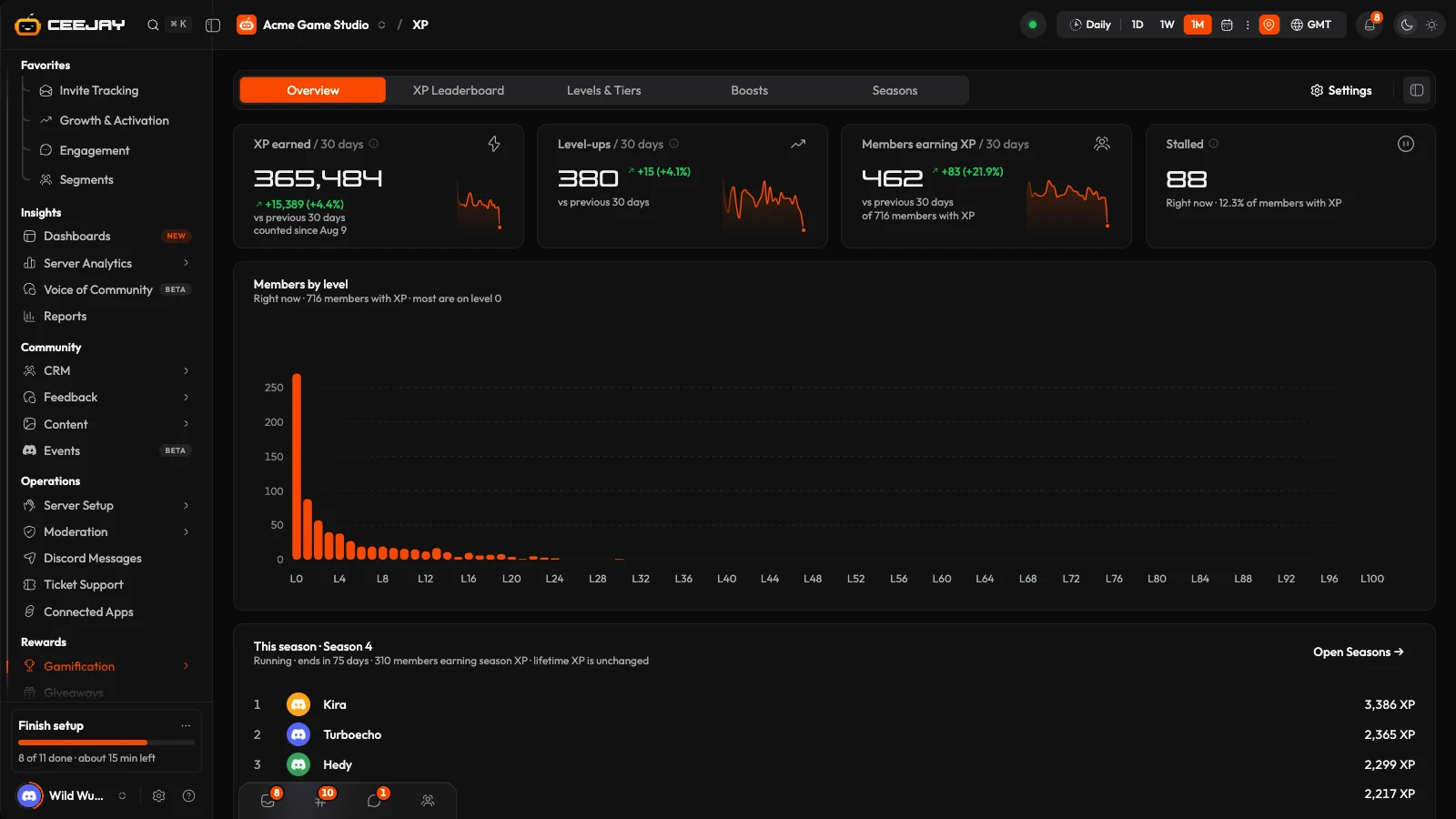
The Overview has four cards:
- XP earned: XP awarded in the range.
- Level-ups: members who reached a new level in the range.
- Members earning XP: members who earned any XP in the range.
- Stalled: members with XP who have not been active for 30 days or more, right now.
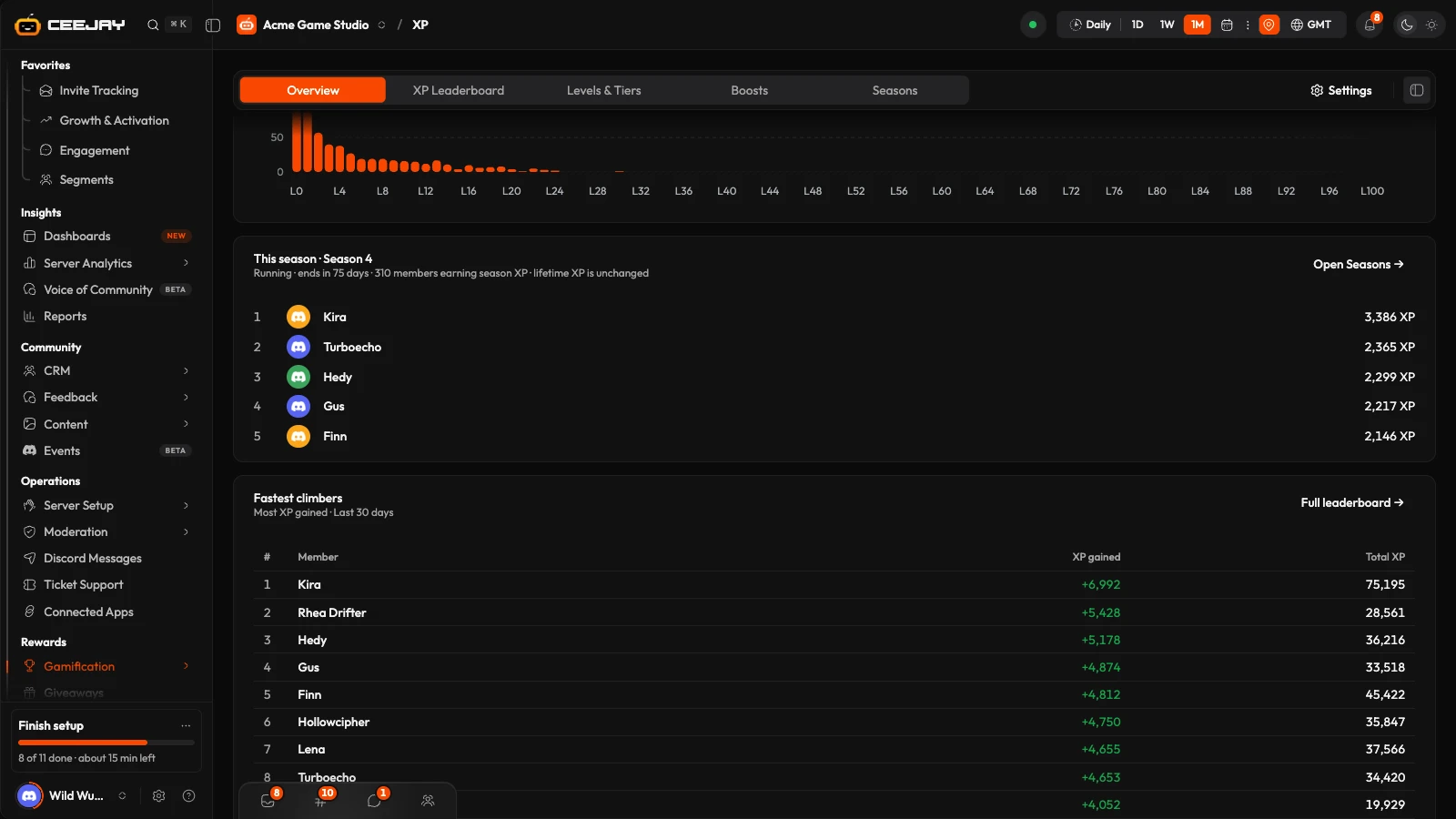
XP earned and Level-ups count from the day XP events were switched on for your community. Below them, Members by level shows how many members sit on each level. While a season is running, a This season card follows it with the season's time left and its top five. Fastest climbers lists the members who gained the most XP in the range.
How members earn XP
These are the defaults. Each source has its own switch and numbers in Settings → Rewards → XP.
| Source | Default | Notes |
|---|---|---|
| Message | 15 to 25 XP, random | At most one award per member every 60 seconds. |
| Voice | 5 XP every 3 minutes | Only with at least 2 members in the channel, and not in the server's AFK channel. Members who have deafened themselves earn nothing. Streaming multiplies it by 1.5. |
| Reaction | 1 XP for a reaction received | One award per member every 300 seconds. |
| Content | 10 XP for an attachment, 15 XP for a thread | One award per member every 120 seconds. |
| Daily bonus | 50 XP | Given with a member's first XP-earning message after 20 hours. |
Other pages can give XP too: quests, polls, giveaways, forms, events and the Starboard.
Good to know
XP awards are whole numbers, rounded down. A reaction value under 1, such as XP Given at 0.5, rounds down to nothing.
Earning rules in Settings
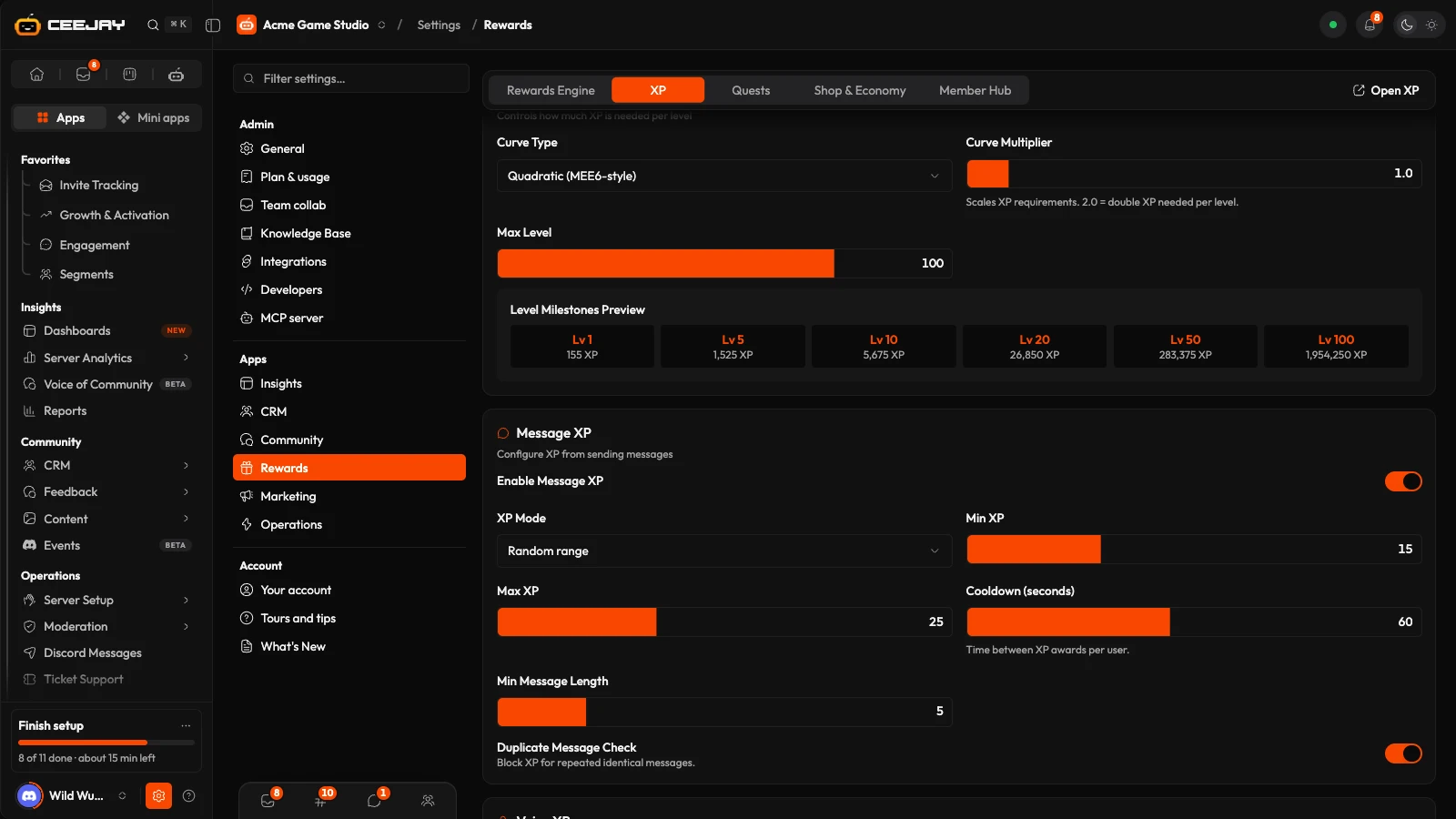
Go to Settings → Rewards → XP. Changes save from the bar at the bottom of the page.
- XP Curve: Curve Type (Quadratic, Linear, Exponential or Flat), Curve Multiplier, Max Level and, for a flat curve, Flat Base XP. A preview shows the XP needed at several levels.
- Message XP: turn it on or off, then choose the XP Mode (Random range, Fixed amount or Per word), Cooldown (seconds), Min Message Length and Duplicate Message Check. Min length and the duplicate check apply while Spam Protection is on.
- Voice XP: XP Per Interval, Interval (minutes), Min Members in Channel, Streaming Bonus Multiplier and AFK Detection.
- Reaction XP: XP Received, XP Given and Cooldown (seconds).
- Content XP: Attachment XP, Thread XP and Cooldown (seconds).
- Starboard XP: XP and coins for the author when a post first reaches a Starboard board, with a daily cap and an option to deduct the XP and coins if the post is removed from the board.
- Anti-Exploit: Spam Protection, Max XP Per Hour and Max XP Per Day, the most XP a member can earn from messages in an hour and in a day.
- Leaderboard Visibility: roles hidden from leaderboards. These members still earn XP and are tracked.
- Daily Bonus & Streaks: Daily Bonus XP, its Cooldown (hours), and streaks with Bonus Per Day, Max Streak Multiplier and Grace Period (hours). A streak continues when the member is active again within the grace period, and adds 10% to message XP for each consecutive day by default, up to 2×. Streaks only run while the daily bonus is on.
- Rested XP: members build up a pool while they are away, at XP Rate (per hour offline) up to Max Hours. On their return, XP up to the size of the pool earns the Rested Bonus Multiplier.
- Level-up Notifications: a message when a member levels up, with a Notification Channel (the channel where the XP was earned if none is set), Send DM Notifications and a Custom Level-up Message that can use
{user},{username},{level}and{xp}. - Default server rank card and Default server leaderboard card: the look of
/rankand/leaderboard xp. - Import from MEE6: a one-time import of your MEE6 levels. It replaces each member's current XP and cannot be undone, and your MEE6 leaderboard must be public. Re-sync level roles then assigns the level roles those members have already earned, because roles are normally only given at a level-up.
XP Leaderboard
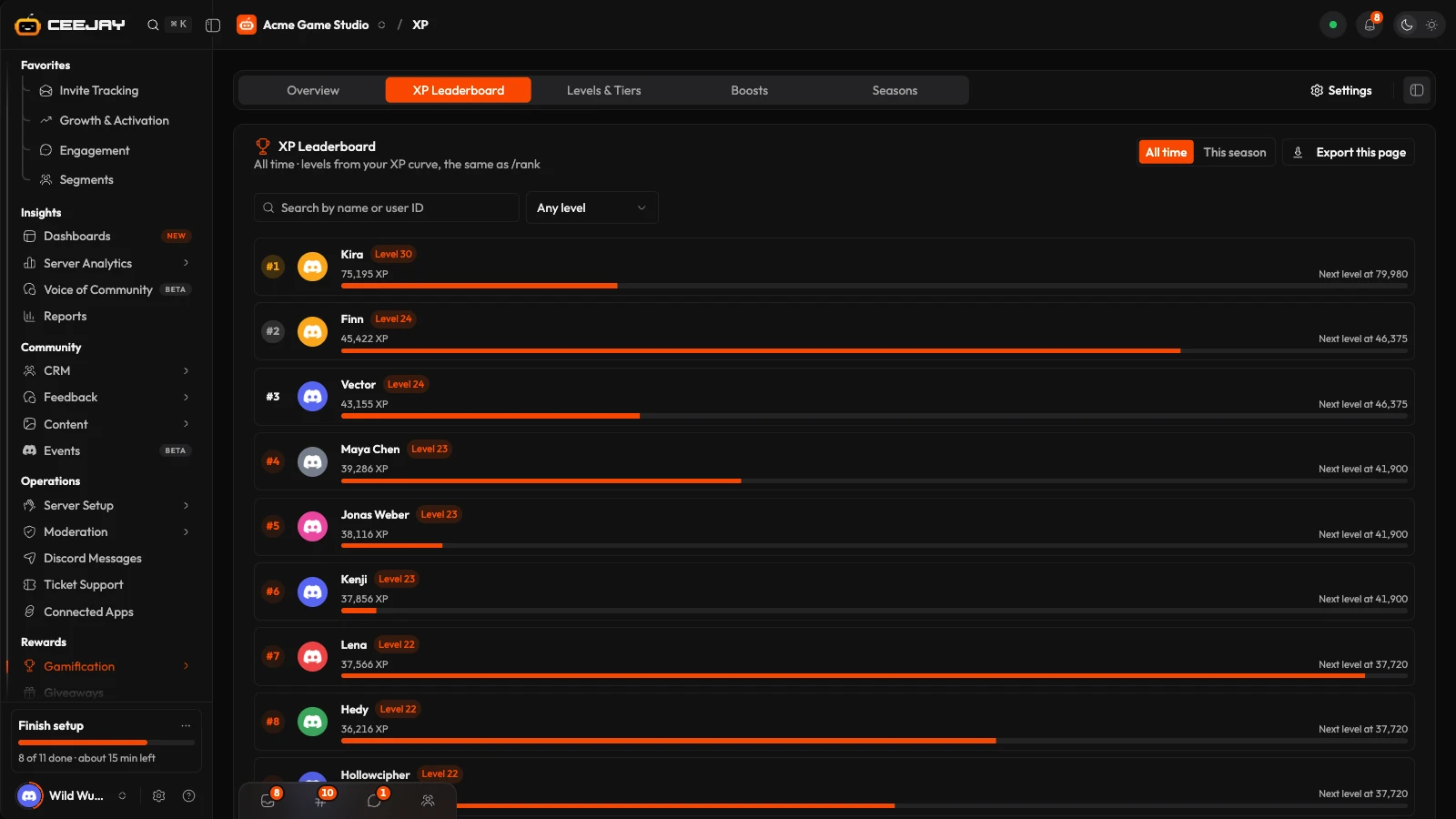
Search by name or user ID, filter by Any level or a minimum level, and switch the scope between All time and This season. A season only changes what is ranked; lifetime XP is never changed. Export this page downloads the rows on screen. Members' levels come from your XP curve, the same as /rank.
Levels and tiers
The Levels & Tiers tab lists every level from 1 to your Max Level, with the XP it needs, how many members are on it and its rewards. Press a level to open it.
- Rewards at level N: a Role, XP or Coins, or anything from the pool in More rewards. They are given when a member reaches the level. If members are already past it, the panel offers Give it to those N members.
- Add opens a menu: Add a level, Add a tier (a name for a range of levels, such as Regular) or Start from suggested tiers. A tier has a Name, a Starts at level and a Colour. Tiers save from the bar at the bottom of the page.
- Removing a level lowers Max Level, so it takes every level above it too, and the page says so on the button.
Boosts
- Channel boosts: messages in these channels earn more XP.
- Role boosts: members with these roles earn more XP on every message.
- Boost stacking: Multiply, Add or Highest only.
- Excluded roles: members with these roles earn no XP at all.
- Active boosts: XP boosts members bought in the shop, with who has one, when it started and when it ends. They multiply that member's XP wherever they earn it.
A boost is a multiplier from 0.1 to 10. Channel and role boosts apply to message XP.
Seasons
A season is a second leaderboard that starts from zero. It never touches lifetime XP, levels or level roles.
On the Seasons tab, press New season.
Enter a Name, and optionally Starts and Ends. With no start date it is saved as a draft.
Under Rewards by place, add rows of Places (for example 1 to 1, or 4 to 10) with a Role and Coins. Perks, codes and game items can be added once the season exists.
Under Season end, choose where to Announce in, and whether the next season starts when this one ends.
Press Create season. A saved season also has Start now, End now and Delete, and each one asks you to confirm.
While a season runs, members earn season XP at the same time as lifetime XP, and the XP Leaderboard can show it under This season. When it ends, the standings are frozen and each rewarded place receives its reward. The season's page shows who was rewarded and whether a role or coins could not be given. If the next season is switched on, CEEJAY creates it from this one, with the same rewards, unless one is already running or scheduled.

