

Home
See how your community is doing this week: who joined, who is talking, how members feel and what is coming up.
Home is the first page you open. It answers how your community is doing this week and what changed since last week, with this week's events beside it.
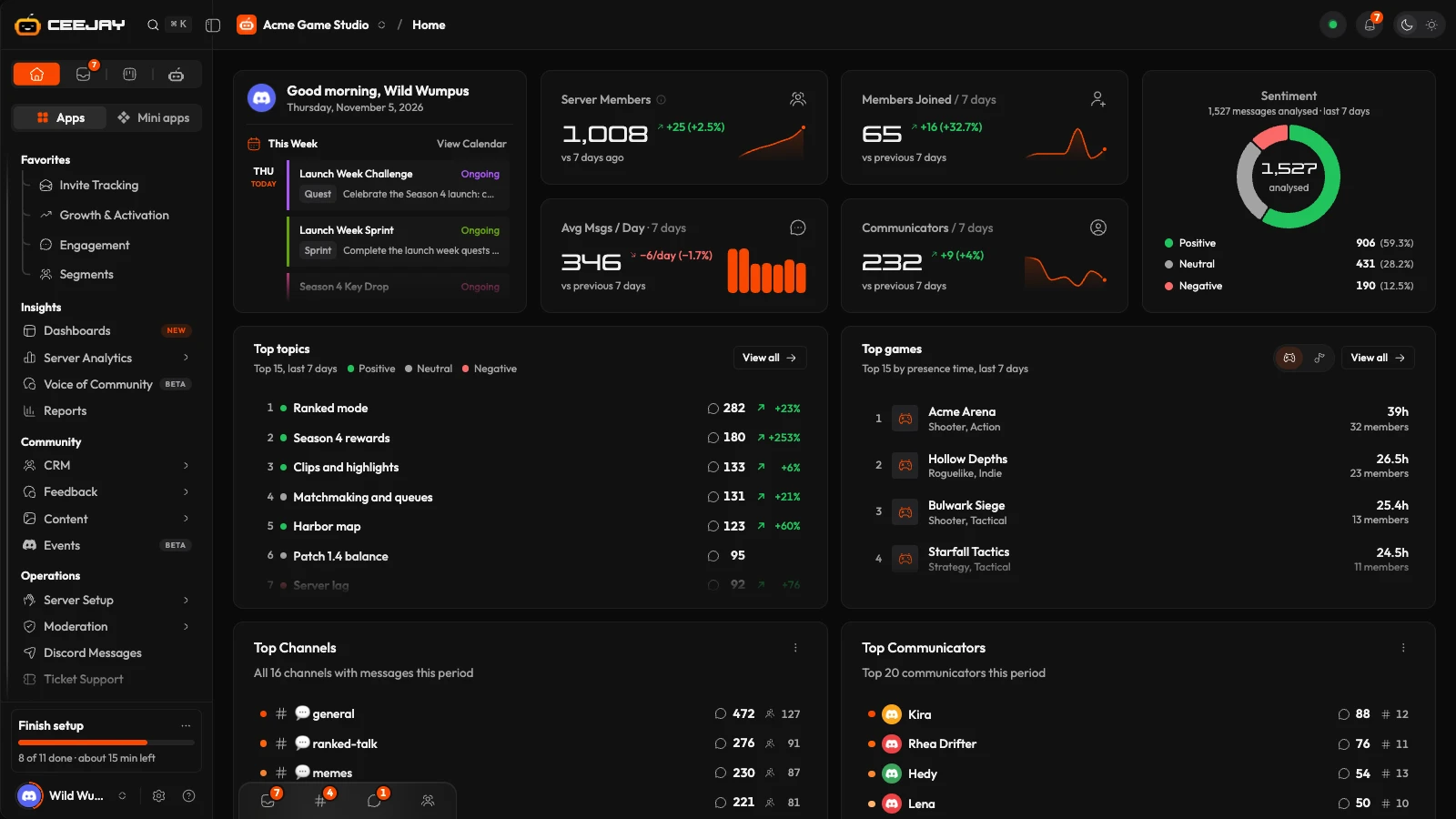
Home always shows the last 7 days against the 7 days before them. It does not follow the range picker in the header, so it reads the same whichever range other pages are on. For any other period, open the page that holds the number, such as Engagement or Growth and Activation.
What you see
From top to bottom:
- A greeting with the date, and This Week: the events, polls, giveaways, announcements and other items your team has scheduled for the next seven days, grouped by day. View Calendar opens the calendar.
- Four stat cards: Server Members, Members Joined, Avg Msgs / Day and Communicators.
- Sentiment: the split of positive, neutral and negative messages from the last 7 days.
- Top topics and a games and music card.
- Top Channels and Top Communicators.
- Guides to help you set up CEEJAY.
The stat cards
Each card shows its change against the 7 days before, with a small chart beside the number. Press the (i) beside a title for its definition.
| Card | What it counts |
|---|---|
| Server Members | Discord's own member count for the whole server, bots included. The CRM → Members page counts only the members CEEJAY tracks, so it can read lower. The change is against 7 days ago. |
| Members Joined | Joins in the last 7 days. When CEEJAY has no join log for the week, the number is rebuilt from member join dates and says so. It misses anyone who joined and left before tracking started. |
| Avg Msgs / Day | Messages per day over the last 7 days. |
| Communicators | Members who sent at least one message in the last 7 days, each counted once. |
When the earlier week was small, the change reads as a plain number ("+12") and not a percentage. A card that cannot load shows a dash with Retry. A dash is never a zero.
Sentiment
The ring shows how many messages from the last 7 days were positive, neutral and negative, with the number analysed in the middle. Hover a slice to see its share. Sentiment is read from the channels you chose in Settings → Insights → Voice of Community. Until CEEJAY has analysed messages, the card says what is needed. For the full picture, open Voice of Community.
Top topics
The topics members talked about most in the last 7 days, each with a dot for its sentiment, a message count and how it moved. Press a topic to open it in a side panel, and View all to open the Topics tab of Voice of Community. With no topics yet, the card offers Open Voice of Community.
Top games and Top music
A card with a switch between Playing and Listening. It lists the games or music your members spent most time on in the last 7 days, ranked by presence time. Press a row to open the game, artist or track in a side panel with its busiest hours and the members behind it. View all opens Activity.
Top Channels and Top Communicators
The channels with the most messages and the members who sent the most, over the last 7 days. These are the same lists as on Engagement. Press a channel to open its side panel, and a member to open their profile.
Good to know
Right-click any card or row on Home for its menu. Channels you hide from analytics under Settings → Insights → Data & Tracking are left out of every number and list here.

