

Growth and Activation
Track joins, leaves and where new members come from, then see whether each new member posts, comes back and stays.
Growth & Activation, at Server Analytics → Growth & Activation, has three tabs. Growth counts how your member base changes. Activation follows new members through their first week: do they do anything, post, get engaged. Retention shows whether they are still here after 30 days and whether they keep coming back. All three follow the range in the header. On Growth, the role filter changes joins and leaves, but the channel filter does not, because they belong to no channel. The Activation cards and the Retention tab take no filters.
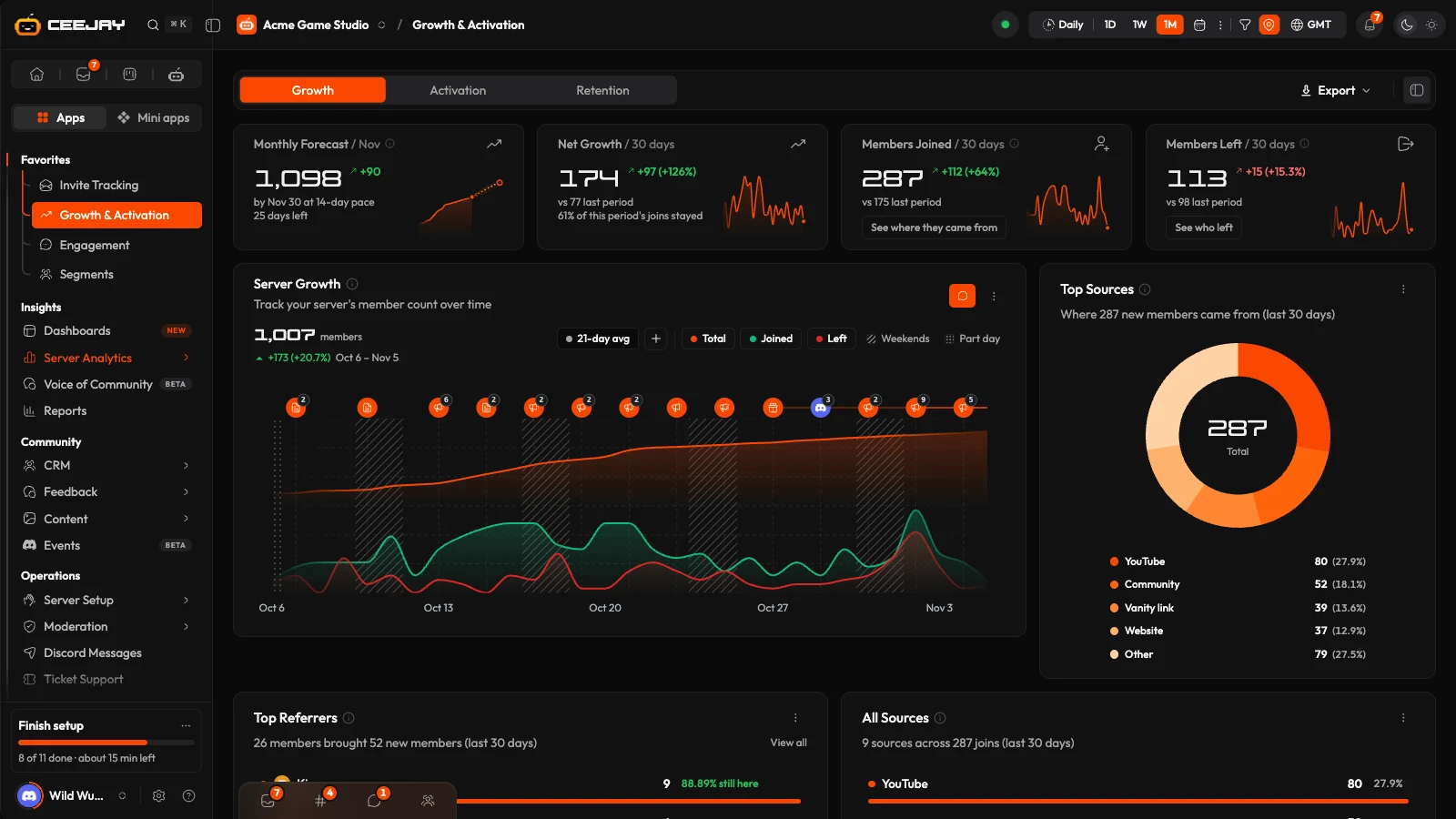
Growth
What you see
- Four stat cards: Monthly Forecast, Net Growth, Members Joined and Members Left.
- Server Growth: your member count over time, with joins, leaves and a moving average.
- Top Sources: where new members came from, as a whole pie with the sources listed under it.
- Top Referrers and All Sources.
- Countries or Regions: a map and a list.
What the cards mean
| Card | What it counts |
|---|---|
| Monthly Forecast | Your member count at the end of this month if it keeps moving at the pace of the last 14 days. That pace is the same whatever range you pick. The line under the change reads "by [date] at 14-day pace". The dashed line on its chart carries a shaded likely range around it. It is an estimate. On ALL this card becomes Total Members. |
| Net Growth | Joins minus all exits. The line under it says what share of the period's joins stayed. |
| Members Joined | Joins in the range. A member who leaves and rejoins counts again. The (i) splits joins into new and rejoined, once any member rejoined. |
| Members Left | Every exit from the server: members who chose to leave, banned, kicked and pruned. |
Each card compares with the period before it. If CEEJAY was not tracking your server that far back, there is nothing to compare with and the change is left out. Members Left is the one where going down is good, so a fall shows in green. Hover its chart to see the day split into left, banned, kicked and pruned. The (i) explains the split and says since when kicks are told apart from members who left. A kick or prune that CEEJAY cannot tell apart counts as chose to leave. CEEJAY reads kicks and prunes from your server's audit log, so the bot needs the View Audit Log permission.
See where they came from on Members Joined jumps to the sources.
See who left
Press See who left on Members Left. The Members Who Left window shows:
- Reason chips with a count each: Left, Banned, Kicked, Pruned and All exits. The Only members who rejoined switch keeps only the members who came back.
- How many were Key Members, Active, Moderate or Lurkers when they left.
- Time as a member, Activity and Leave date (by day of the week).
- A list of Individual Members, which you can sort by Impact, Most recent, Tenure or Messages, and narrow by role. A badge marks a member who was banned, kicked or pruned, or who rejoined. Press a member to open their profile.
Bans and kicks also appear, with who did them and why, in Safety.
Where members come from
Top Sources and All Sources are built from invite tracking. A join counts under a source when the bot could match it to an invite link. Joins it could not match, such as direct links, expired invites or joins from before CEEJAY was added, are grouped as unknown. Top Referrers lists the members who invited the most members and the share of their invitees who are still active.
The map shows where invite link clicks came from, by country, with a switch between Countries and Regions. It needs URL invite tracking. Without it the card says to set that up. It shows where clicks came from, not where members live.
Set up links and read more on Invite Tracking.
Estimate
When no join log covers the range you picked, Members Joined is rebuilt from the join dates on member profiles and carries an Estimate chip. It misses anyone who joined and left before tracking began. Members Left then reads Not tracked with a No data note, because Discord keeps no history of who left. It is never shown as zero.
Activation
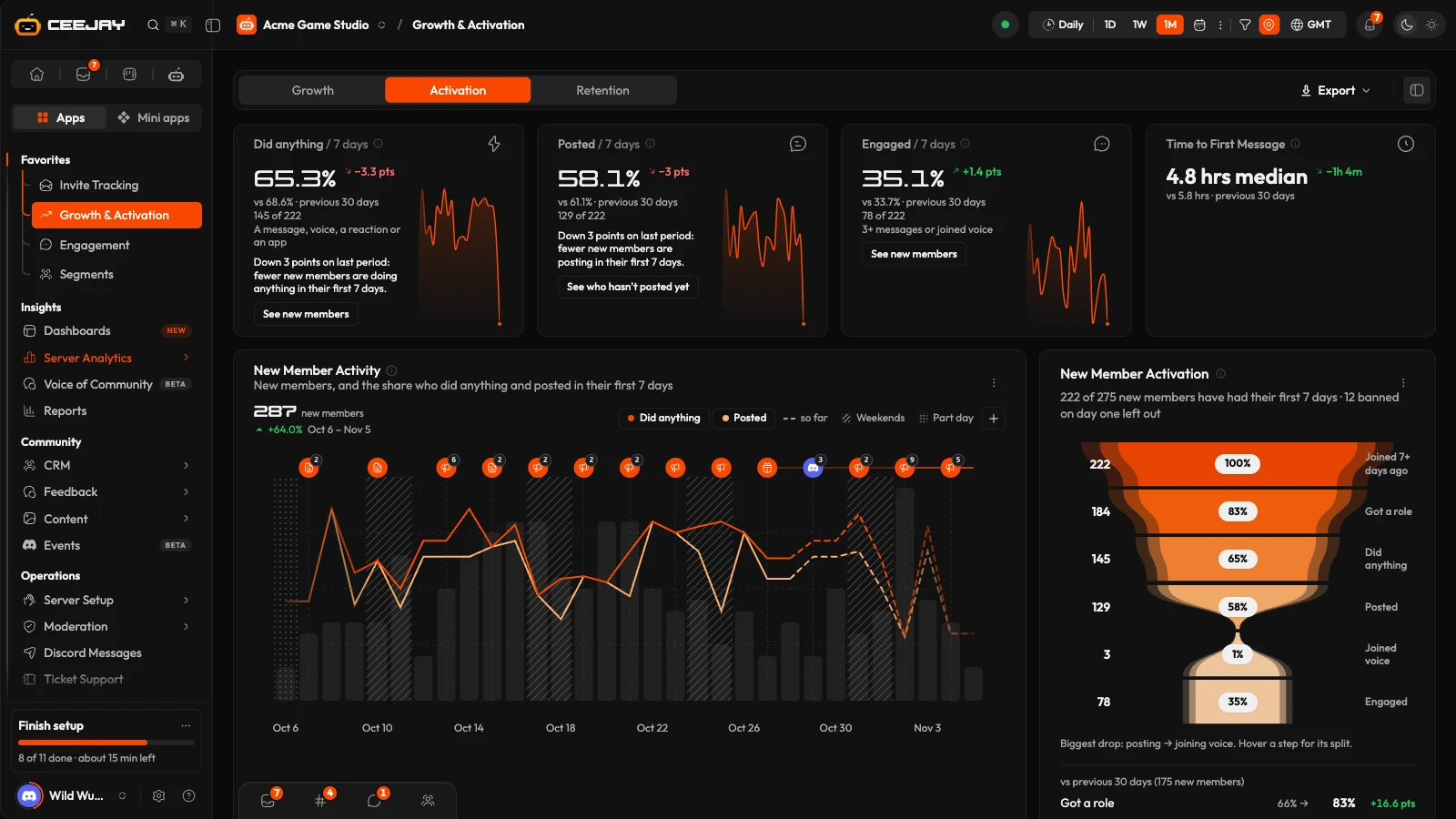
The four cards
Activation counts only new members whose first 7 days are over, so every figure is a finished one. A line under each card says how many that is, for example "The 148 who joined 7+ days ago". If nobody has had 7 days yet, the card says "Too soon" instead of showing 0%. A member banned within a day of joining is left out, because nearly all of those are spam.
| Card | What it counts |
|---|---|
| Did anything | The share of new members who sent a message, joined voice, added a reaction or did something in an app within 7 days of joining. |
| Posted | The share who sent at least one message within 7 days. |
| Engaged | The share who sent 3 or more messages, or joined voice, within 7 days. |
| Time to First Message | The median time from joining to a first message, for members who sent one within 7 days. The line under it gives the average. |
Rates change in percentage points against the previous period. Press a card's (i) for its definition. With a channel or role filter on, these cards say "Not available with filters on".
On a short range, where nobody has had 7 days yet, the cards read the range's own new members over the days each has had so far, and the page says so.
New Member Activity
New members per day, with lines for the share of each day's joiners who did anything and who posted within their first 7 days. The + button adds more: Joined voice, a moving average, and Text and Voice activation in 24 hour, 7 day and 30 day tiers. Hover a point for that day's numbers.
New Member Activation
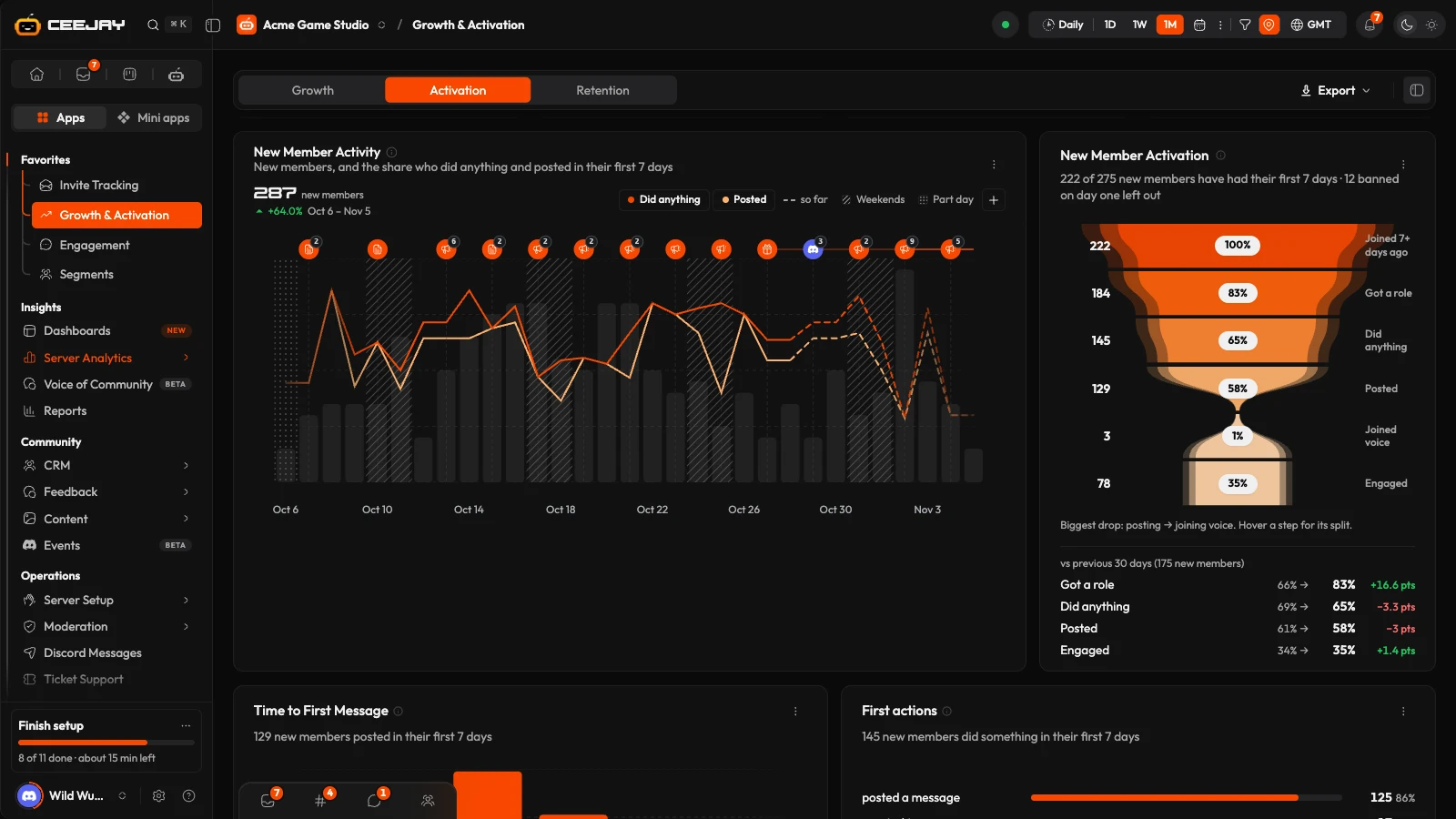
The funnel shows where new members drop off in their first week: Joined 7+ days ago, Got a role, Did anything, Posted, Joined voice (only when someone did) and Engaged. Hover a step for how many reached it, and how many of those did so within a day. Got a role is usually the verified or onboarding role your server assigns.
Time to First Message and First actions
Time to First Message charts how long new members take to post. First actions shows the first thing each new member did, such as a message, voice or a reaction, and offers Set up a welcome message when many do nothing.
Retention
Retention reads at least the last 3 months. A shorter range still shows 3 months, and the page says so above the cards.
| Card | What it counts |
|---|---|
| Retained | Of new members who joined at least 30 days ago, the share still in the server on day 30. |
| Left on day one | The share gone within 24 hours of joining, by choice, banned, kicked or pruned. |
| Active in week 1 | Of members who joined at least 14 days ago, the share who did anything 7 to 13 days after joining. |
| Active in week 4 | Of members who joined at least 35 days ago, the share who did anything 28 to 34 days after joining. |
Below the cards:
- Week 1 retention: for each week's new members, the share active 7 to 13 days after joining.
- Cohort Retention: each week's new members and the share active in each week after joining.
- Time to leave: how long new members stayed before leaving, and how they left.
A share from only a few members shows its counts with a Low sample chip.
Good to know
A communicator on Activation is a new member who sent 3 or more messages or joined voice. The Communicators card on Engagement uses the word more loosely: there it means anyone who sent at least one message.

